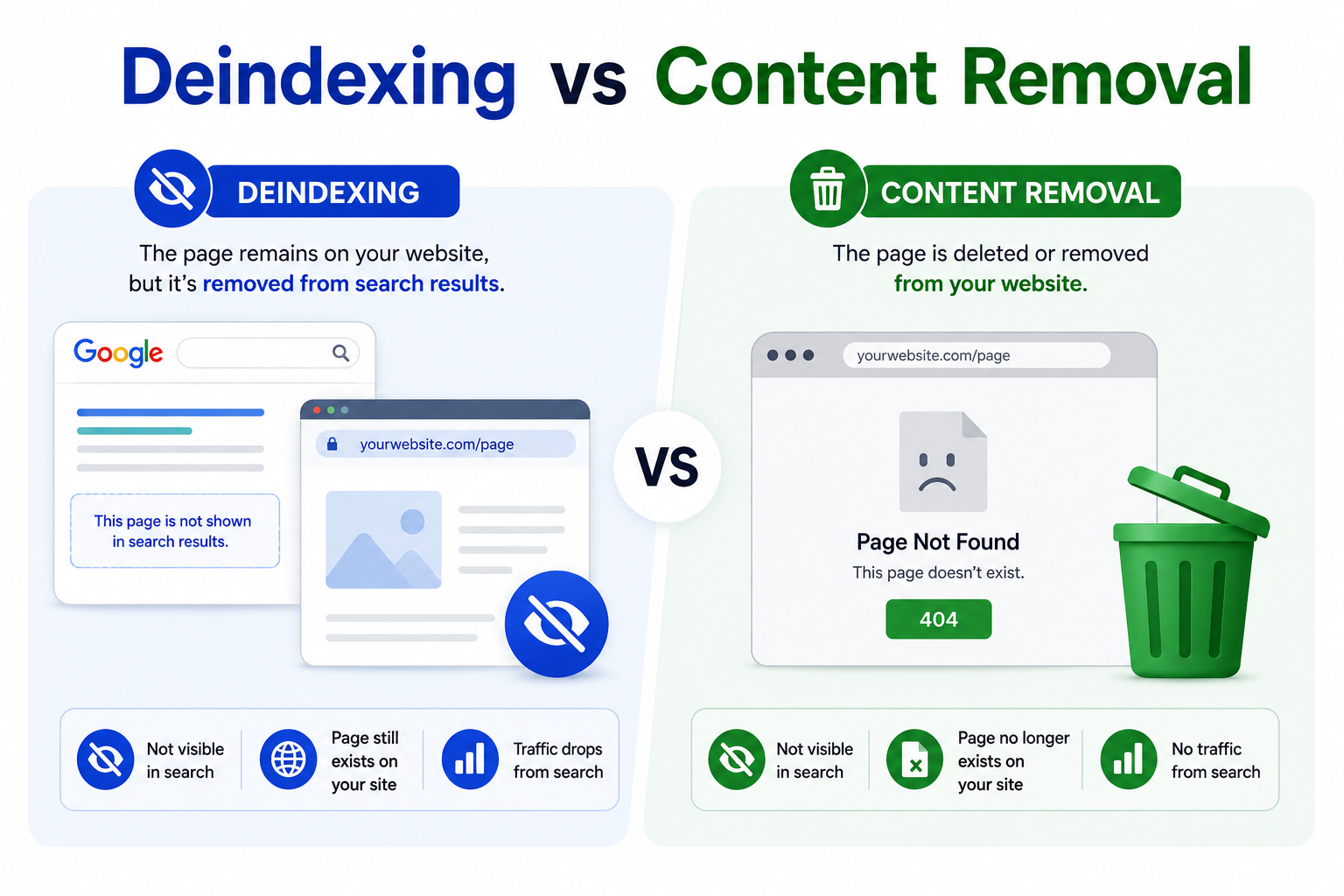
Deindexing and content removal may sound similar, but they are different actions in SEO and website management. Both can stop a page from appearing in search results, but they work in different ways. Understanding the difference is important because choosing the wrong method can affect your website traffic, rankings, and user experience.
What Is Deindexing?
Deindexing means removing a page from a search engine’s index. In simple words, the page will not appear in Google or other search engine results.
However, the page may still exist on your website. If someone has the direct URL, they may still be able to open it.
For example, imagine you have a thank you page on your website. You want users to see it only after they submit a form. You do not want this page to appear on Google. In this case, you can deindex the page.
So, deindexing means:
- The page stays live on your website
- The page is hidden from search results
- Users can still access it with the direct link
- Search engines are told not to show it
What Is Content Removal?
Content removal means deleting or removing the page or content from your website.
When content is removed, users cannot access it anymore. If they visit the old URL, they may see a 404 not found page or a message saying the page is gone.
For example, if you published an old offer page and the offer has expired, you may remove that page from your website. After search engines crawl the page again and see that it no longer exists, they will eventually remove it from search results.
So, content removal means:
- The page is removed from your website
- Users cannot access the content anymore
- Search engines will remove it after recrawling
- The URL may show a 404 or 410 status
Main Difference Between Deindexing And Content Removal
The main difference is simple.
Deindexing hides the page from search engines but keeps it live on the website.
Content removal deletes the page or content from the website itself.
Think of it like this:
Deindexing is like removing a book from a library catalog. The book is still inside the library, but people cannot find it through the catalog.
Content removal is like removing the book from the library completely. Even if someone knows the title, they cannot read it because the book is no longer there.
Deindexing vs Content Removal Table
| Point | Deindexing | Content Removal |
|---|---|---|
| Meaning | Removes a page from search results | Removes the page or content from the website |
| Page status | Page usually stays live | Page is deleted or removed |
| User access | Users can open it with the direct link | Users cannot access it after removal |
| Search visibility | Page does not appear in search results | Page disappears after search engines recrawl it |
| Common method | Noindex tag, URL removal tool | Delete page, remove content, 404, or 410 |
| Best used for | Private pages, duplicate pages, thank you pages, test pages | Outdated pages, wrong information, expired offers, harmful content |
| SEO impact | Search traffic to that page stops | Search traffic stops if the page is fully removed |
| Speed | Can be faster with removal tools | Website removal is instant, search removal may take time |
| Example | A login page hidden from Google | An old product page deleted from the site |
Simple Chart
Page Type                 Website Status        Search Result Status
-------------------------------------------------------------------
Normal indexed page        Available             Visible
Deindexed page             Available             Not visible
Removed page               Not available          Removed after recrawl
How Deindexing Works
Deindexing usually happens when search engines receive a signal that a page should not be shown in search results.
The most common method is the noindex tag. This is a small piece of code added to a page. It tells search engines not to index that page.
Example:
<meta name="robots" content="noindex">
When Google crawls the page and sees this tag, it understands that the page should not appear in search results.
Deindexing can also happen through search engine removal tools, robots meta tags, or sometimes due to penalties. If a website breaks search engine rules, some pages may be removed from search results.
How Content Removal Works
Content removal works by deleting the page or removing the content from the website.
When a page is removed, the server usually returns a 404 or 410 status code.
A 404 means the page is not found.
A 410 means the page is gone permanently.
Search engines understand these signals. After they crawl the URL again, they may remove it from their index.
Content removal is useful when the page should no longer exist at all.
When Should You Use Deindexing?
You should use deindexing when the page should stay live but should not appear in search results.
Common examples include:
- Thank you pages
- Login pages
- Admin pages
- Cart pages
- Checkout pages
- Internal search result pages
- Duplicate pages
- Test pages
- Staging pages
- Private landing pages
These pages may be useful for users, but they do not need to rank on Google.
For example, a checkout page is important for customers, but it should not appear in search results. So, deindexing is the better choice.
When Should You Use Content Removal?
You should use content removal when the page or content should not exist anymore.
Common examples include:
- Expired offer pages
- Old event pages
- Incorrect information
- Harmful content
- Duplicate pages with no value
- Deleted product pages
- Outdated service pages
- Pages with legal or privacy issues
For example, if your website has a page about a product you no longer sell, you may remove the page. But if the page has backlinks or traffic, you may redirect it to a related product instead of simply deleting it.
SEO Impact Of Deindexing
Deindexing can affect SEO because the page will no longer bring organic search traffic.
If you deindex the wrong page, your traffic may suddenly drop. For example, if a blog post that ranks well is accidentally noindexed, it may disappear from Google results.
That is why you should carefully check before deindexing important pages.
But deindexing can also help SEO when used correctly. It keeps low value pages out of search results and helps search engines focus on your important pages.
SEO Impact Of Content Removal
Content removal can also affect SEO. If the removed page had rankings, backlinks, or traffic, deleting it can reduce your website performance.
Before removing a page, check whether it has value. If it has traffic or backlinks, consider updating it or redirecting it to a related page.
If the page has no value and is outdated, removing it may be the right choice.
Which One Is Better?
There is no single best option. It depends on your goal.
Use deindexing if the page should remain available but hidden from search engines.
Use content removal if the page should no longer be available to anyone.
Here is a simple rule:
If users still need the page, deindex it.
If nobody needs the page, remove it.
Common Mistakes To Avoid
One common mistake is using robots.txt to block a page when you actually want to deindex it. If search engines cannot crawl the page, they may not see the noindex tag.
Another mistake is deleting a page without checking its SEO value. If the page has traffic or backlinks, removing it without a redirect can hurt SEO.
A third mistake is accidentally adding noindex to important pages during website development or redesign.
Final Thoughts
Deindexing and content removal are both useful, but they serve different purposes.
Deindexing removes a page from search results while keeping it live on your website. Content removal deletes the page or content from the website itself.
If you want to hide a page from Google but still allow users to access it, choose deindexing. If the content is outdated, wrong, harmful, or no longer needed, choose content removal.
Using the right method helps protect your SEO, improve user experience, and keep your website clean.
Leave a Reply