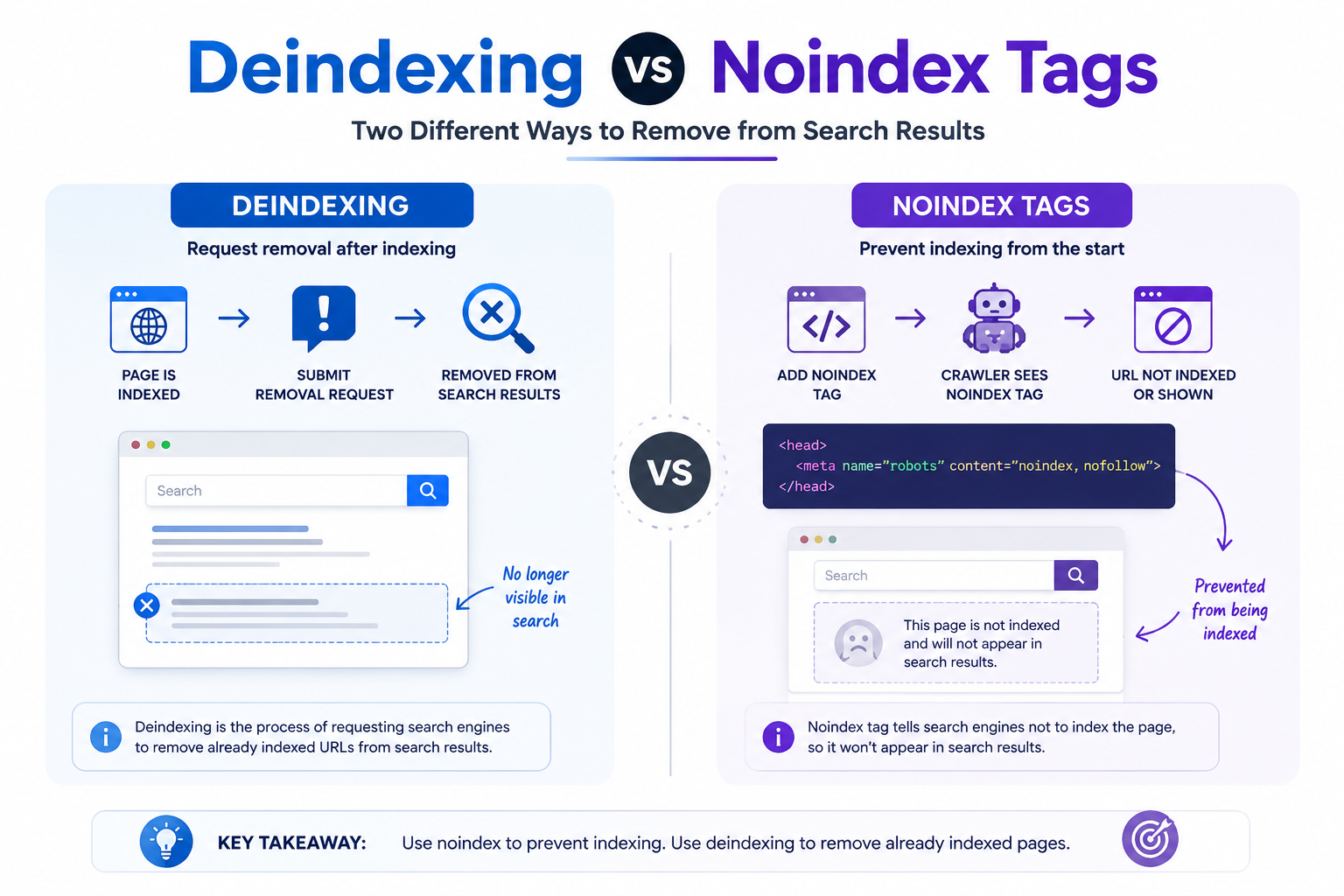
In the competitive landscape of search visibility, the difference between pages that rank and those that vanish entirely often comes down to two distinct technical approaches. Deindexing and noindex tags each serve unique purposes in managing how search engines treat your content. This discussion examines their fundamental differences, appropriate applications, and the strategic considerations that determine which method protects your site’s performance most effectively.
Understanding Deindexing
Deindexing removes specific URLs from search engine databases entirely using Google Search Console’s Removals tool or Bing Webmaster Tools. This process differs from simply blocking crawler access because deindexing actively clears existing entries from the index rather than preventing future visits.
Website owners can request removal through three established methods. The first approach uses the Google Search Console Removals tool for temporary removal lasting up to six months. The second method involves robots.txt disallow directives targeting specific URLs to stop crawler visits. The third option sends server-side 410 Gone status codes that signal permanent deletion to search engines.
Google processes removal requests within 24 to 48 hours after submission. Consider a site administrator who needs to eliminate an outdated product listing at /old-product-page. They submit the URL through the Removals tool and receive confirmation that the page will disappear from search results during the temporary period.
Deindexing creates a stronger separation than crawl prevention alone. When crawlers receive access denial through robots.txt, they may still retain previously indexed data in their databases. True deindexing forces complete removal from Search Engine Result Pages rather than just limiting future discovery attempts.
Understanding Noindex Tags
Noindex tags instruct search engine crawlers not to include specific pages in search indexes while still allowing crawl access. These directives help control which content appears in search results without blocking access entirely. Proper implementation prevents unwanted pages from affecting overall site visibility.
Website owners use noindex directives to manage search presence across different content types. The approach works through several technical methods that target specific file formats and platforms. Each method serves distinct scenarios where content should remain accessible yet excluded from indexes.
Googlebot requires compliance with these tags during the crawling process. When crawlers encounter a valid noindex instruction, they respect the directive and remove or exclude the page from search results. This process applies consistently across major search engines that follow standard indexing protocols.
Implementation varies based on file type and content management system. HTML pages use one approach while non HTML files require different handling methods. Platform specific settings provide additional options for users working within popular website frameworks.
The HTML meta tag method works for individual pages through direct code placement. Add the following syntax to the head section of any HTML document: meta name equals robots content equals noindex. This approach targets single URLs that need exclusion from search results.
For entire site sections, apply the same tag across multiple pages through template modifications. Content management systems allow bulk application through theme files or page builders. This method ensures consistent treatment of related content groups without individual page edits.
The X Robots Tag HTTP header addresses non HTML files such as PDFs and images. Server configuration files send this directive before file delivery occurs. Administrators add the header through web server settings to control indexing of downloadable resources.
This header method proves essential when meta tags cannot be embedded in file content. PDF documents and other binary files benefit from server level instructions that search engines recognize. Configuration varies by server software but follows standard header formatting conventions.
WordPress users access noindex controls through the Yoast SEO plugin settings. Navigate to the advanced section within page or post editing screens to enable the option. Plugin settings also allow category and archive level application for broader content exclusion.
The plugin interface simplifies tag implementation without direct code editing. Users select noindex options through dropdown menus and checkbox controls. These settings generate proper meta tags automatically during page rendering processes.
Key Differences
Deindexing and noindex tags serve different technical purposes with distinct implementation requirements. Each method addresses search visibility challenges through separate mechanisms that affect how search engines handle page presence.
Deindexing works through direct requests to remove URLs from existing search engine databases. Noindex tags operate as instructions delivered during the crawling process itself.
Understanding these distinctions helps determine which approach suits specific indexing control scenarios. The choice depends on whether immediate removal or ongoing prevention serves the goal better.
Both techniques achieve search result exclusion but through fundamentally different technical pathways. Implementation decisions should align with content management needs and timeline requirements.
Control Level
Deindexing operates at database level removing URLs entirely, while noindex tags provide page-level crawl instructions. These methods differ significantly in how they grant control over search engine indexing processes.
Deindexing requires manual URL submission through Search Console for each individual page. This approach includes a six-month expiration period that necessitates renewal requests. Each submission targets one specific URL at a time through the available tools.
Noindex tags allow broader application across multiple pages through template modifications or robots meta tag configurations. Site administrators can implement these directives at scale without individual submissions for each URL.
Consider removing fifty duplicate product pages through template-level noindex tags versus submitting separate deindex requests for each page. The noindex approach affects all matching pages simultaneously while deindexing demands individual attention to each URL.
Reversibility
Deindexing creates temporary six-month removal requiring renewal, while noindex tags provide immediate reversible control. The restoration process varies substantially between these two indexation control methods.
Deindexed URLs require fresh Search Console requests after the expiration period ends. Site owners must also remove any robots.txt blocks that previously prevented access to those pages.
Noindexed pages reappear in search results within one to four weeks after tag removal. Search engine crawlers process the updated directives during their next visit to the affected pages.
Google typically recrawls pages within three to seven days on average once noindex directives are removed. This timeline depends on existing crawl frequency patterns for the specific website domain.
Impact Scope
Deindexing removes specific URLs from all search results permanently until renewed, while noindex affects only targeted pages. The breadth of influence differs markedly between these search visibility approaches.
Deindexing eliminates entire URLs from Google and Bing databases across all possible search appearances. This complete removal extends to every search engine result page where those URLs previously appeared.
Noindex preserves crawl access for link equity while blocking index inclusion. Search engine crawlers can still follow links from these pages even though the content itself does not appear in results.
Deindexing category pages removes two hundred URLs from search visibility entirely. Noindex on paginated archive pages maintains internal link structure while preventing those specific pages from appearing in search results.
When to Use Deindexing
Use deindexing for urgent removal of indexed content that violates legal requirements or contains sensitive data. This approach works when Search Engine Indexing has already happened and immediate action becomes necessary. The process targets specific URLs that need quick suppression from search results.
Court-ordered content removal represents one clear scenario. When legal compliance demands instant SERP Removal, deindexing provides the fastest path forward. A company facing litigation might need certain pages hidden immediately while the case proceeds through the courts.
Data breach situations require the same urgency. Customer information exposed through a security incident needs removal within 24 hours to protect affected individuals. Google Search Console offers tools to request quick processing in these critical moments.
Duplicate content penalties create another situation where deindexing proves useful. Sites facing algorithmic issues benefit from a clean index slate after addressing the underlying problems. This approach clears problematic URLs faster than waiting for natural reindexing cycles.
When to Use Noindex Tags
Apply noindex tags to control indexing of low-value pages without removing them from server access. These tags signal search engine crawlers to skip certain URLs while keeping the pages functional for users. This approach helps maintain clean index profiles without disrupting site operations.
Thank you pages and confirmation URLs often benefit from noindex directives. These pages duplicate content already shown during checkout or form submissions. Preventing their inclusion avoids unnecessary entries that add little value to search results.
Internal search result pages present another common scenario for noindex implementation. Dynamic queries can generate countless similar pages with overlapping content. Applying the tag prevents these from competing against primary content in search engine results.
Print versions and PDF duplicates require consolidation of ranking signals. Multiple formats of the same material split authority across different URLs. A noindex tag directs crawlers toward the main version instead.
Staging and development environments demand careful indexing control to avoid accidental exposure. These testing areas often contain incomplete or confidential content. The tag ensures search engines ignore these temporary locations entirely.
WordPress users can implement noindex on specific sections through common SEO plugins. Set the directive on /cart/, /checkout/, and /my-account/ pages via Yoast SEO settings. This targets transactional areas that should remain outside search indexes while staying accessible to logged-in customers.
Best Practices
Combine noindex tags with canonical URLs and proper robots.txt configuration for optimal crawl efficiency. This approach ensures search engines understand both your indexing directives and preferred page versions. Multiple control layers prevent conflicts that could waste resources or create confusion.
Regular audits help maintain clean search visibility across your entire site. Experts recommend checking the Index Coverage Report monthly to identify issues such as Submitted URL marked noindex errors. These reports reveal pages that should appear in results but currently do not.
Before applying any noindex directive, verify current status through the URL Inspection Tool. This step confirms whether pages already carry exclusion signals or face other indexing barriers. Checking prevents unnecessary changes that might disrupt existing search performance.
Some file types cannot receive meta tag instructions directly. Use the X-Robots-Tag header for PDF documents and image files that require indexing control. This method applies the same exclusion logic through server level configuration instead of HTML markup.
Track how search engines allocate resources to different sections of your website. Monitor crawl budget allocation to ensure valuable pages receive priority indexing over low priority content. Proper distribution improves overall site performance in search results.
Keep clear records of every exclusion decision across your website structure. Document all noindex implementations in a site architecture map for team reference. This practice supports consistent management when multiple people handle technical updates.
Common Mistakes to Avoid
Incorrect combination of noindex tags with robots.txt disallow creates permanent crawl blocks preventing content updates. Robots.txt files block all access to pages, yet noindex tags require crawlers to reach those pages first. This conflict leaves site owners unable to reverse decisions later.
Many teams apply noindex directives to critical pages like homepages or main category listings. These areas drive organic discovery and send signals about site structure to search engines. Removing them from indexing eliminates the foundation of search visibility.
Another frequent error involves using noindex tags on paginated archive pages instead of proper canonical tags or rel attributes. This approach cuts off link equity that flows through pagination sequences. Search engines interpret these pages as separate content rather than connected parts of a larger structure.
Forgetting to remove noindex tags after content updates creates lasting barriers to indexing. Pages remain excluded from search results even after quality improvements get made. Regular audits help catch these oversights before they affect performance.
Leave a Reply